Cómo Hacer tu Primera Llamada API a Qwen de Alibaba y Conectarlo con MSTY
Si estás interesado en utilizar el modelo Qwen de Alibaba y conectarlo con MSTY, sigue estos pasos detallados. Esto te permitirá configurar tu entorno y hacer una llamada API exitosa.
🔹 1. Crear una Cuenta en Alibaba Cloud
Si aún no tienes una cuenta en Alibaba Cloud, regístrate en su portal. Asegúrate de activar Model Studio para obtener la cuota gratuita y crear tus credenciales de API.
🔹 2. Obtener la Clave API
- Dirígete a la consola de Model Studio.
- En la parte superior derecha, selecciona API-KEY.
- Crea una nueva API Key. Si estás utilizando un espacio de trabajo subalterno, asegúrate de que esté autorizado para usar los modelos.
🔹 3. Configurar la Clave API como Variable de Entorno
Para mantener segura tu clave API, es recomendable configurarla como una variable de entorno. Esto reduce el riesgo de exposición en el código.

agregamos la url:
https://dashscope-intl.aliyuncs.com/compatible-mode/v1
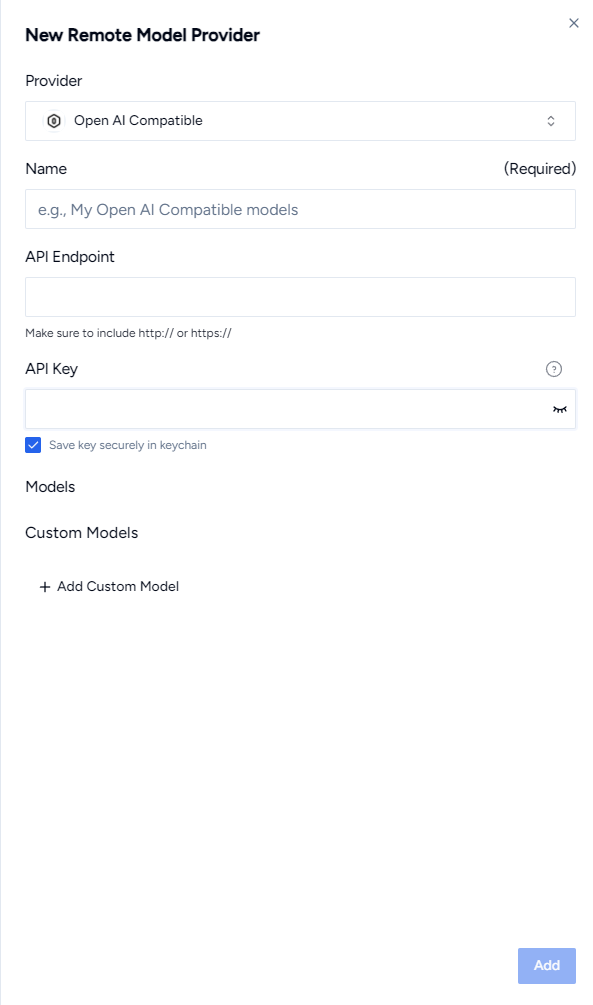
Presionamos
y cargaran lo modelos.
Para obtener la API de Aliaba y usar Qwen Max / Plus y Turbo
nos dirigimos a
https://bailian.console.alibabacloud.com/?spm=a3c0i.29328889.9325669630.7.4a912d2fnsTc5H
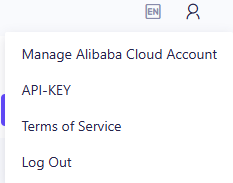
Ahora agregas dicha API a Msty y listo
How to Make Your First API Call to Qwen from Alibaba and Connect It with MSTY
If you’re interested in using Alibaba’s Qwen model and connecting it with MSTY, follow these detailed steps. This will allow you to set up your environment and make a successful API call.
🔹 1. Create an Account on Alibaba Cloud
If you don’t have an Alibaba Cloud account yet, register on their portal. Be sure to activate Model Studio to get the free quota and create your API credentials.
🔹 2. Obtain the API Key
Go to the Model Studio console.
In the top right corner, select API-KEY.
Create a new API Key. If you’re using a sub-workspace, make sure it is authorized to use the models.
🔹 3. Set the API Key as an Environment Variable
To keep your API key secure, it is recommended to set it as an environment variable. This reduces the risk of exposure in the code.
Add the following URL:
arduinoCopiarEditarhttps://dashscope-intl.aliyuncs.com/compatible-mode/v1
Click Submit, and the models will load.
To obtain the Alibaba API and use Qwen Max/Plus and Turbo, go to: Alibaba Console for API
Now, add this API to MSTY, and you’re all set!